Gatez · How it worksThe security-review document

How it works · the security-review document

How the gate works, in full.

The home page shows the gate in four steps. This page is the long version for the person who must review it: identity, limits, what leaves the network, the audit record, and the questions a review will ask.

Your most valuable data cannot leave. Your agents already act on it.

The data that matters most cannot go to an AI API. So the model and the agent come to the data. There, agents have moved from answering questions to taking actions: booking, paying, changing records. Three things are now missing.

  • 1 / 3

    Nothing outside the agent stops it

    Any approval check lives inside the agent's own code. The security team did not write that code and cannot review every change to it. So the programme waits.

  • 2 / 3

    One action, three products, three logs

    The request enters through an API gateway, the prompt passes an LLM proxy, the tool call passes an agent runtime. Each keeps its own log. Nobody can join them.

  • 3 / 3

    Nobody can prove who allowed it

    When the auditor asks who approved an agent's action, there is no single record with the agent, the person and the time. The answer is a search across three systems.

The first question a regulated buyer asks is not "which model?" It is "how are the agents identified and tracked?" This page answers that question.

A person decides before the agent acts.

The gate is policy at the gateway, not code inside the agent. Mark a tool as risky once, per team. Every call to it then follows four steps.

Fig. 2 — The four states of one risky callBlueprint
The four states of one risky call agentcalls a risky tool gatez · agent gatewaystores the call · stops itpending status + id → agent 1 · held — nothing has run a named personapprove · change · deny 2 · decided in the approvals queue toolruns once, same session 3 · resumed audit row4 · recorded · hash-only unanswered → expires, the call never runs
The four steps
№StateWhat happens
1HeldThe agent calls a tool marked risky. The gateway stores the call and stops it. Nothing has run. The agent receives a pending status with an id.
2DecidedA named person opens the approvals queue, sees the agent, the tool and the arguments, and approves, changes or denies the call. An unanswered approval expires, and the call never runs.
3ResumedOn approval the gateway runs the stored call once, in the same session, with the same limits. The agent continues. No code in the agent changed.
4RecordedOne audit row: team, session, agent, tool, approver, time, and the hash of the input and the result. Content is never stored.
Fig. 3 — The approvals queue, Operator PortalLive
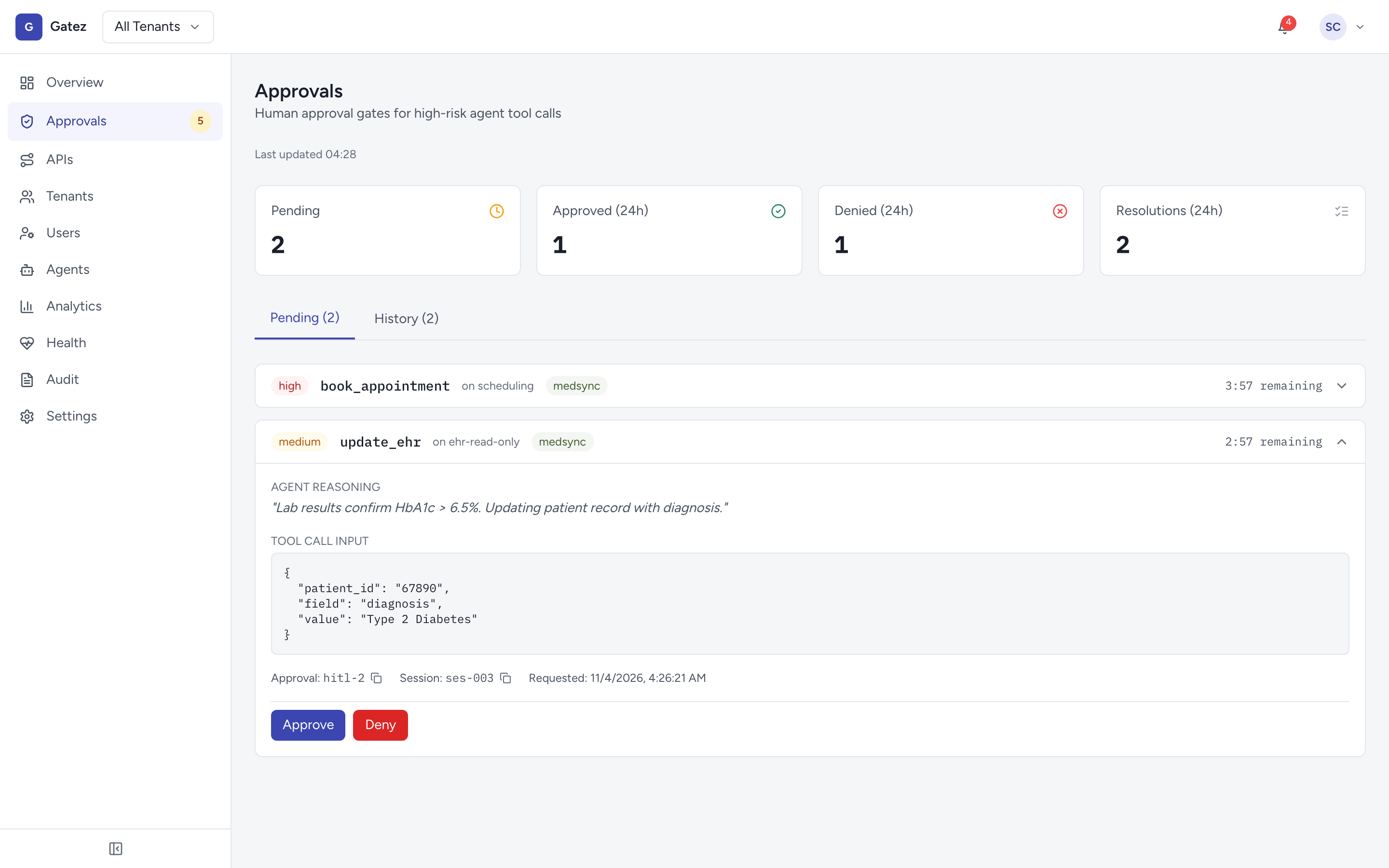
The Operator Portal with the Approvals page open: two pending calls, one expanded with its reasoning, input and the Approve and Deny buttons
high · book_appointment
Expires if unanswered
The approvals queue in the Operator Portal. A team user can approve the gates of their own sessions in the Developer Portal. Nobody can approve another team's calls.

Reads such as "get patient record" can be allowed without a gate. Writes such as "book appointment" can require one. The team's policy decides, and a team with no policy cannot call tools at all.

Every action carries the name of the agent and of the person who started it.

Agents delegate to agents. Three hops later, a log that says only "agent C called delete_customer" answers none of the auditor's questions. Gatez answers all three.

  • Q 1

    Who started it

    A person authenticates and opens the session. Their identity is the first link of the chain, and it travels with every hop.

  • Q 2

    Who handed it on

    Each delegation receives a short-lived token by RFC 8693 token exchange. The token names the acting agent and the chain before it. It is checked when minted and again at the call.

  • Q 3

    Who ran the tool

    The token reaches the tool server with the call. The audit row records the token's subject, the approver and the result hash, so one row answers "who allowed this?".

Fig. 4 — A delegation chain with two blocked hopsBlueprint
Delegation chain with blocked hops nurse.kimperson · opens the session agent:triageacts for nurse.kim agent:scheduleracts for triage → nurse.kim tool serverreceives the token token 1token 2token 3 hop back to the caller: blocked (loop) hop into another team: blocked
A delegation chain as the audit page shows it: person → agent A → agent B → tool. Each hop narrows what the next may do. The gateway blocks a hop back to its caller and a hop into another team.
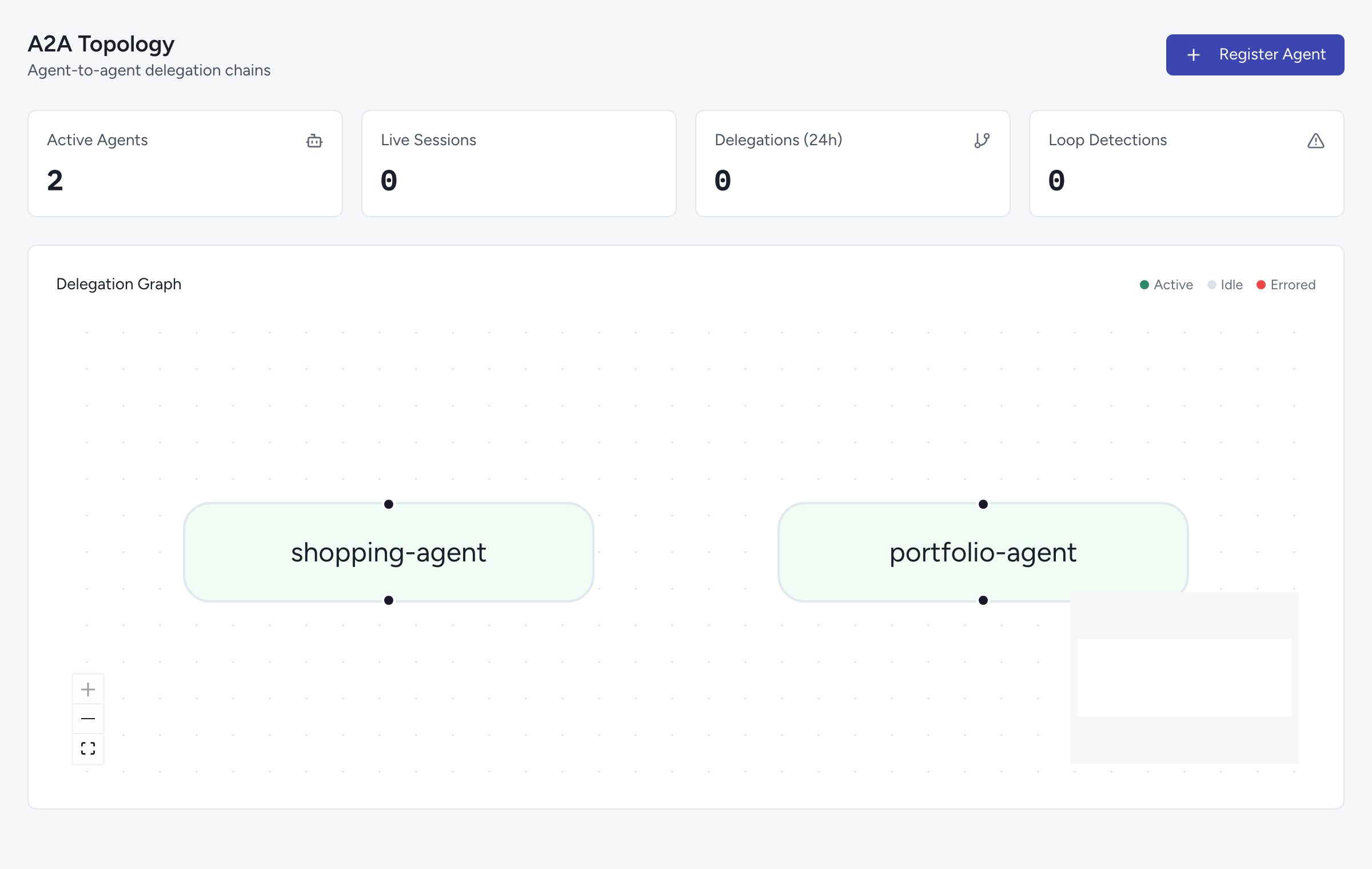
Fig. 5 — A2A topology, Operator PortalLive
The A2A Topology page in the Operator Portal: active agents, live sessions, delegations, loop detections, and the delegation graph with two registered agents
Loop detections
Registered agent
The A2A topology page in the Operator Portal: registered agents and the delegation graph between them.

Each team gets its own limits. No agent can spend what the team did not grant.

Approval handles the risky call. Limits handle everything else: which tools exist for a team, how many tokens a session may burn, how deep a delegation may go.

  • Limit 1

    Tool allowlists, deny by default

    A team's agents see only the tools the team was granted. No wildcard. No policy, no tools.

  • Limit 2

    Token budgets

    A budget per team and per session, checked before the call and charged after the response. The portal shows the gauge.

  • Limit 3

    Rate limits per team per route

    One bucket per team per route. A burst from one team never slows another.

  • Limit 4

    Delegation limits

    A maximum chain depth, loop detection, and no delegation across teams. A runaway chain stops at the gateway and the audit row says why.

Fig. 6 — The policy editor for one teamLive
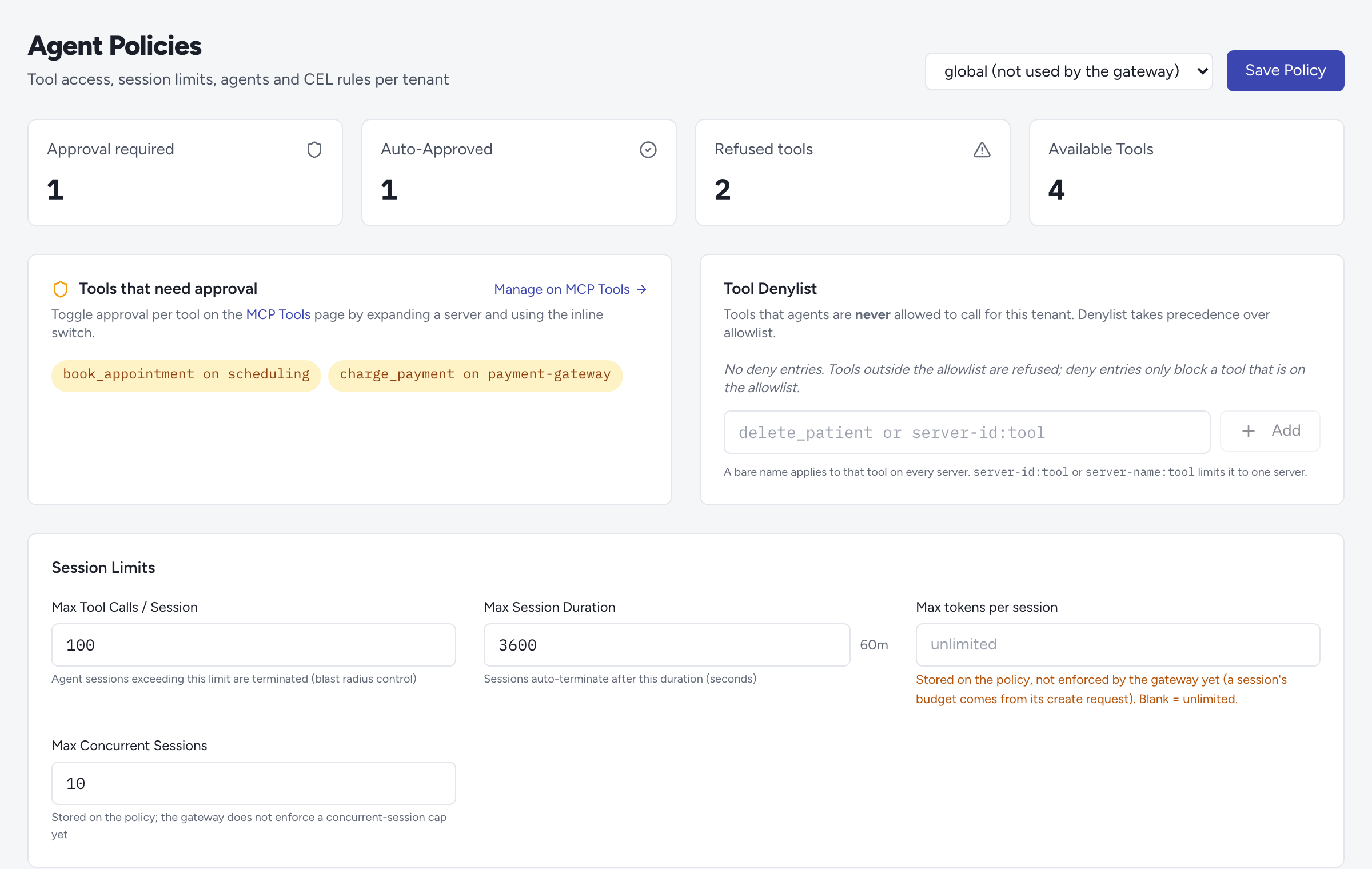
The Agent Policies page in the Operator Portal: tools that need approval, the tool denylist, and session limits for one tenant
Needs a person
Denylist
Session limits
The policy editor for one team: allowed tools, which ones need a person, the token budget. Read-only view of the live gauge beside it.

Nothing leaves the network unless you decide it does.

AI is coming to the data, not the other way round. Gatez is built for that direction. The same layout runs in your data centre or in your own cloud account.

Fig. 7 — What runs inside the wallBlueprint
What runs inside the wall your network, or your cloud account apps and agentsyour code, your SDK calls gatez API gateway AI gateway Agent gateway · the approval gate local modelsOllama · on your hardware redis · clickhouse · portalscache, limits, audit store, two portals your egress proxy→ a cloud model, on your allowlist only if a cloud model is configured outside the wall
What leaves the network in each mode. Local-model mode: nothing. Cloud-model mode: one checked connection, through your proxy.

One entry point. One tenant model. Three kinds of traffic.

Security requires one entry point. Gatez puts API traffic, model traffic and agent traffic behind one gateway, and gives each team one id that follows every call through all three.

  • Layer 1

    API gateway

    Routes, keys, rate limits per team, request logs. The front door for every call, including the ones that never touch a model.

  • Layer 2

    AI gateway

    One OpenAI-compatible endpoint in front of cloud providers and local models. Redaction before the call, budgets, cache, failover between providers.

  • Layer 3

    Agent gateway

    Tool calls (MCP) and agent-to-agent delegation (A2A). The approval gate, allowlists, delegation limits and the audit trail live here.

Same team id in:rate-limit buckets · token budgets and cache keys · tool policies and approvals · every log row and trace

Two portals, by design

The Operator Portal is for the platform team: every team, every policy, every approval. The Developer Portal is for one team: its APIs, its keys, its usage, its sessions, its own approvals. It never shows another team's data.

Already running Kong, WSO2 or APISIX? Keep it. Gatez can sit behind it as the AI and agent layer, or in front of everything as the one entry point. The gate, the budgets and the audit work either way.

Fig. 8 — The same team from both sides
Operator Portalall teams
retaillimits set · 2M tokens
wealthlimits set · 500k tokens
clinical3 approvals waiting
payflow · partner2 routes only
Developer Portalteam: clinical
My APIs2 published
My keys1 active
Token budget412k / 500k
My approvals1 waiting
Operator Portal (left) and Developer Portal (right), the same team seen from both sides.
Fig. 9 — The tenant list, Operator PortalLive
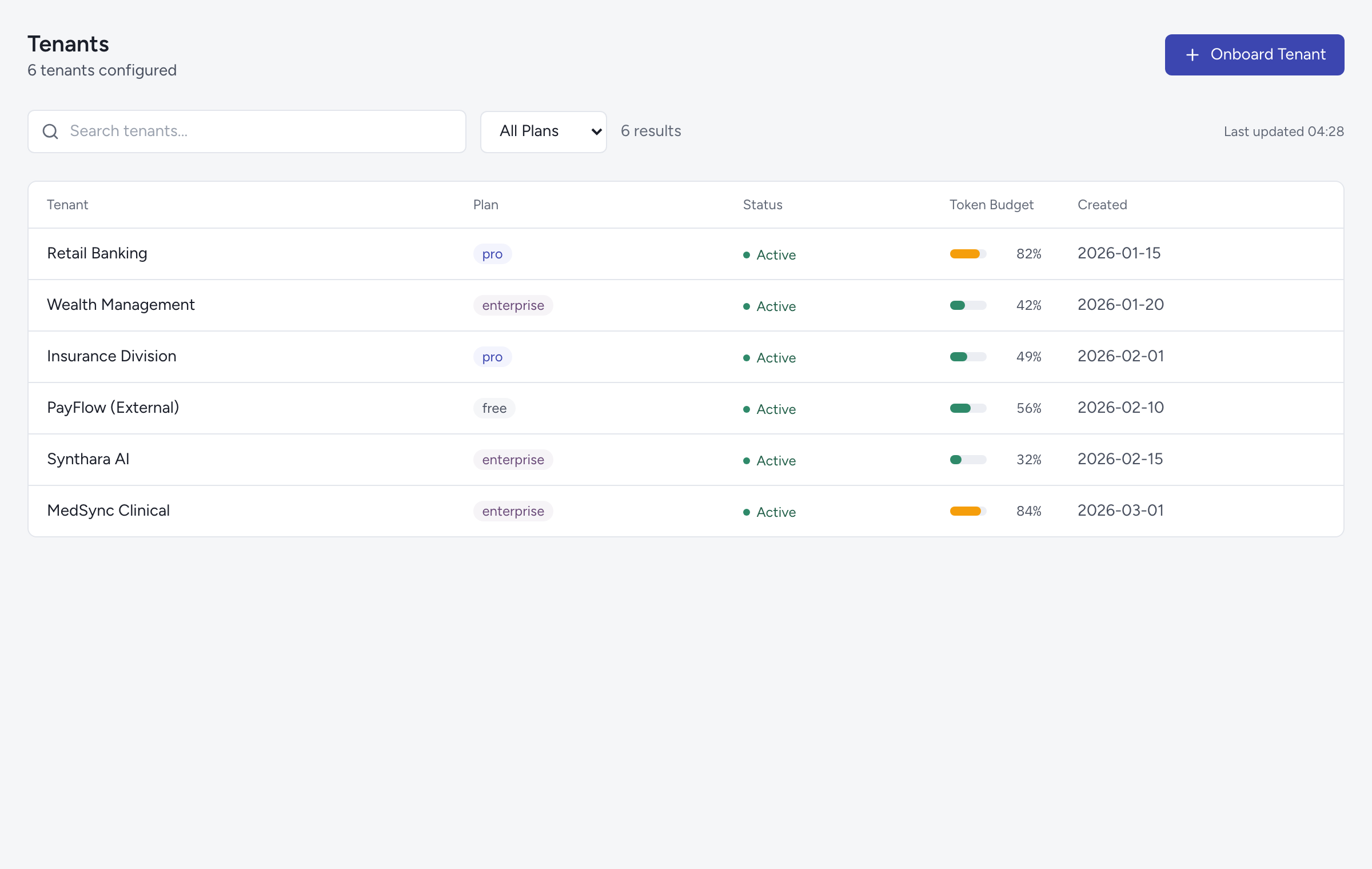
The Tenants page in the Operator Portal: six teams with plan, status, token budget gauge and creation date
Token budget per team
External partner
The tenant list in the Operator Portal: every team, its plan and its token budget gauge.

When the auditor asks who allowed it, you hand over one file.

One audit trail across the three kinds of traffic. The export is built for a compliance team that may not trust the people who produced it.

  • A

    Hash-only

    Every row stores the hash of the input and of the result, never the content. A prompt or a patient record is never in the audit store and never in the export.

  • B

    Signed manifest

    The export is a CSV plus a manifest that lists the file, its hash, the row count, the team, the time range and who exported it. The manifest is signed with the gateway's key. Anyone can verify it against the published public key.

  • C

    Retention you set

    Request logs 90 days, model usage 365 days, audit rows without expiry, by default. All three are settings. The export itself is recorded as an audit event.

Fig. 10 — The audit log, Operator PortalLive
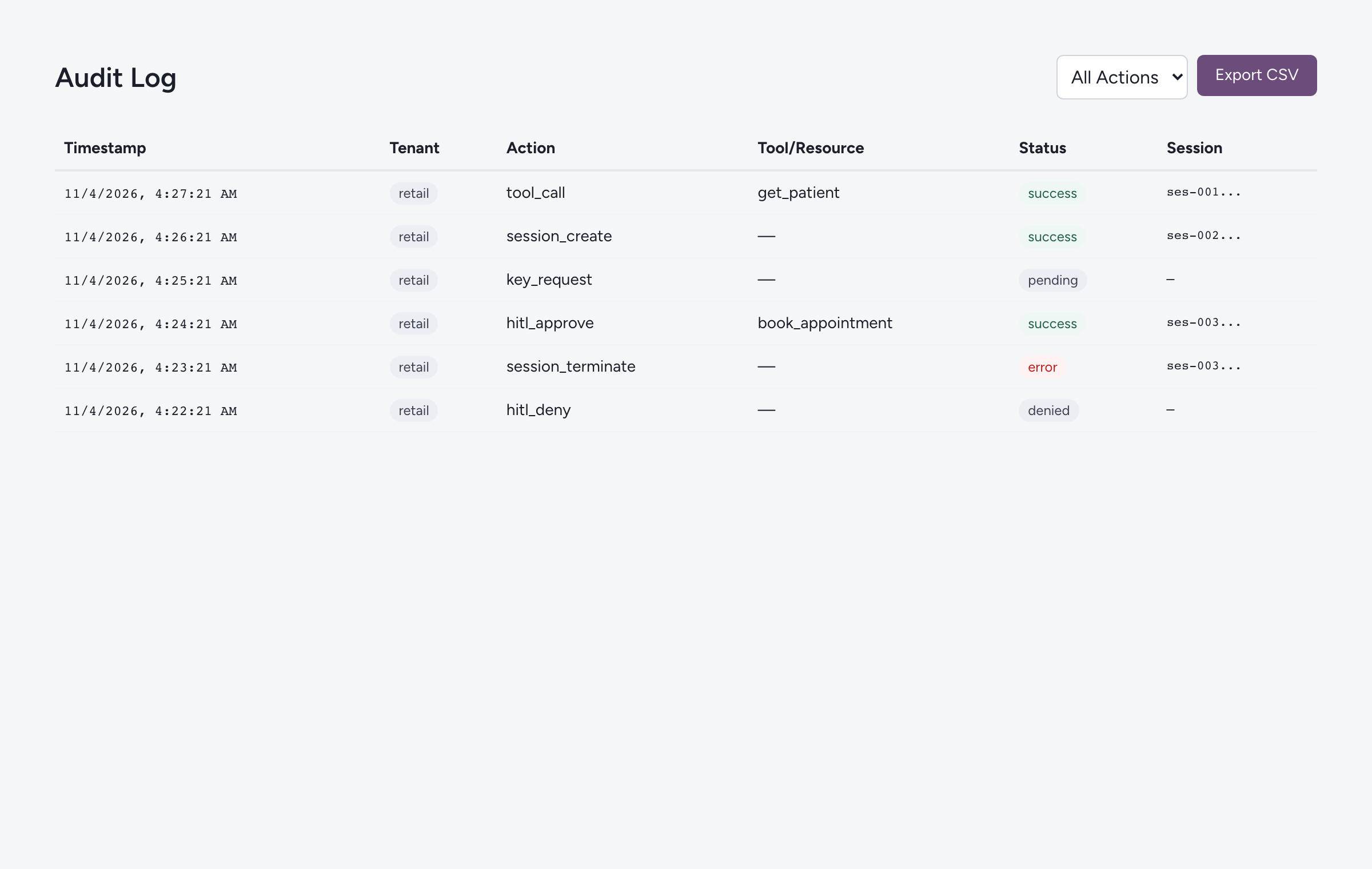
The Audit Log page in the Operator Portal: a table of timestamp, tenant, action, tool, status and session, with an Export CSV button
hitl_approve · the approval row
The audit log in the Operator Portal: one row per action, with the Export CSV button.
What one audit row holds
LoggedNot logged
team · session · agent · toolprompt content
delegation chain · approver · timeresponse content
resulttool arguments in clear
a hash of each payloadauthorization headers, stripped before any write
Retention, by default
TableRetention
Request logs90 days
Model usage365 days
Audit rowsNo expiry
All threeSettings
Fig. 11 — An export: the CSV and its manifest
audit-clinical-2026-01-01-2026-03-31.csv
time,team,agent,tool,action,approver,hash
14:02:16,clinical,triage,book_appointment,approved,nurse.kim,9f2c…
14:02:17,clinical,triage,book_appointment,tool_call,—,1b7e…
audit-clinical-2026-01-01-2026-03-31.manifest.json
{ "file": "audit-clinical-….csv",
  "sha256": "e3b0…", "rows": 38200,
  "tenant": "clinical",
  "range": ["2026-01-01", "2026-03-31"],
  "exported_by": "kim.sec", "alg": "EdDSA",
  "signature": "MEUCIQ…" }
An export: the CSV and its manifest. The row shows agent, approver, time and a hash. No content.

We hold no compliance certification today. The evidence is the audit trail, the signed export, and a control mapping for HIPAA that your reviewer can read.

Built for the organisations that could not say yes before.

Four kinds of buyer. Each has a security team that must approve agent actions, an auditor who will ask who allowed them, and data that cannot leave.

  • Case 1

    A bank with four business units

    Retail, wealth, insurance and an external payments partner each run as a separate team behind one gateway. The partner sees two APIs and nothing else. The platform team sees every team's usage and approves every key. One audit trail covers the chatbot's model calls and the agent's actions.

    Regulated AI →

  • Case 2

    A hospital running clinical agents

    A triage agent reads records without a gate and may not book an appointment until a nurse approves. The research team has no access to patient tools at all. The model is local, so patient data never leaves the network. The quarterly export shows every approval with the approver's name.

    Agent governance →

  • Case 3

    A government agency with no internet

    Every service runs from images carried in on a disk. Models run on local hardware. For the most sensitive team, every tool call needs a person, and the audit trail is kept with no expiry. Nothing phones home, including the licence check.

    Regulated AI →

  • Case 4

    A consultancy with several clients

    Each client is a team with its own budget, its own tools and its own model rules: one client on a cloud provider through the proxy, one on local models only. Each client's audit trail exports on its own, signed, for that client's compliance team.

    AI cost control →

Your engineers can test it before your lawyers meet ours.

One command starts the whole stack on a laptop. The SDK adds the gate to an existing app with one decorator. Nothing on this page needs a sales call to verify.

  • i

    One command

    make up starts the gateway, the portals and the stores from pinned images. Measured at 7.5 minutes on a fresh machine. The Operator Portal prints its login at the end.

  • ii

    Three verbs

    The Python SDK has three verbs an app already understands: llm, approve, trace. Decorate a function with @gz.approve("refund", reversible=False) and a person decides before it runs. Your on_approved handler receives the decision.

  • iii

    Standards, not inventions

    OpenAI-compatible API. MCP for tools, A2A for delegation. RFC 8693 token exchange for delegated identity. RFC 9728 and RFC 8414 for MCP authorization (resource-server side). OpenTelemetry traces across all three layers.

Fig. 12 — The gate from the SDKPython
from gatez import Gatez
gz = Gatez()                                  # reads GATEZ_URL and GATEZ_API_KEY

@gz.approve("refund", reversible=False)       # a person decides before it runs — by policy, not by code
def refund(order_id: str, amount: float):
    return payments.refund(order_id, amount)

answer = gz.llm.chat(model="gpt-4o-mini", messages=msgs)
refund("ORD-789", 79.99)                      # runs now, or raises PendingApproval (id + portal link)
The gate is a state, not a blocking call. Scripts can wait for the decision; services receive a signed webhook. (Human-in-the-loop, if your RFP uses that term.)

Read the docs → architecture, data flow, API reference.

The questions your security reviewer will ask.

Short answers here. Long answers in the docs. Anything not live is marked.

Q 01Does any data leave our network?

In local-model mode, no. Prompts, tool calls and audit records stay inside the wall. If you configure a cloud model, that call leaves only through the egress proxy you control, to a host on your allowlist. The gateway itself refuses cloud metadata, link-local and private addresses as destinations. Personal data is redacted before any model call.

Q 02Who approves, and can an agent get around the gate?

A named person approves in the portal, and the audit row carries their name. The gate is gateway policy, not agent code: the agent cannot change it, and a team with no stored policy cannot call tools at all. An unanswered approval expires. The agent then receives a refusal, and the stored call is never run.

Q 03What exactly is logged, and what is not?

Logged: team, session, agent, tool, delegation chain, approver, time, result, and a hash of each payload. Not logged: prompt content, response content, tool arguments in clear, or authorization headers, which are stripped before any write. Retention is a setting per table: 90 days for request logs, 365 days for model usage, no expiry for audit rows, by default.

Q 04What happens when the model provider is down?

The AI gateway opens a circuit after repeated failures, retries with backoff, and routes to the next provider in the chain you configured, which can be a local model. The approval gate, the limits and the audit trail do not depend on any model provider. They keep working while a provider is down.

Q 05How is one team or client isolated from another?

Every call carries the team's id from the edge to the audit store. Rate-limit buckets, token budgets, cache keys, tool policies, approvals and log rows are all keyed by it. Delegation across teams is blocked at the gateway. The Developer Portal cannot show another team's data. Isolation is covered by an automated test suite that runs before every merge.

Q 06Can we run it with no internet at all?

Yes. Every service runs from container images pinned by digest and verified before start. Models run locally through Ollama. The licence is checked offline at start-up, never by calling home. Live today: the documented procedure with your own registry or a tar file. In progress: one bundle command for the whole stack, and a software bill of materials beside every image.

Q 07How is Gatez licensed?

By a commercial licence per deployment, after a pilot in your environment. The licence file is validated once at start-up and logged. It never gates request traffic and never phones home.

Q 08Which certifications do you hold?

None yet, and we will say so before you ask. The evidence we bring to a security review today: the hash-only audit trail, the signed export your team can verify, a control-by-control mapping to HIPAA, and an install that runs with no internet. We answer security questionnaires in writing.
A commercial licence, after a pilot on your infrastructure.

We do not publish prices, because every deployment is sized differently. We do publish how buying works.

Three steps
№StepWhat happens
1DemoThirty minutes on a live system, with your scenario: a risky action held, approved, resumed and recorded.
2PilotGatez runs in your environment, with success criteria agreed in writing. Your compliance team reviews the audit export before anyone talks about a licence.
3LicenceAn annual licence for the deployment. Three tiers: Standard; Pro, with deployment help and extended support; Enterprise, with on-site or cleared-personnel support and multi-year terms.
Request a demo See the tiers → Talk to us about the tier that fits your deployment.

See a risky action held, approved and recorded, on a live system.

Bring one scenario your security team has not been able to approve. We will run it through the gate in front of you, inside a network that lets nothing out.